

Just another Static Site Generator (SSG)? Honestly, yes — but Roq is a little different. It’s a thin layer on Quarkus, which gives it a different kind of potential.
I’ve spent time looking at other SSGs in the JavaScript ecosystem (Gatsby, Next.js, Nuxt) and in other languages (Hugo, Jekyll, JBake…). Roq borrows many of their popular features and conventions.
What really stands out, though, is that these SSGs have to re-implement most of the core building blocks inside their framework.
With Quarkus, we already get almost everything we need out of the box — and that’s a key distinction:
- Quarkus has Qute as Type-Safe template engine, some sugar for Roq.
- Roq Plugins and Themes are Quarkus extensions.
- Quarkus allow to serve files statically and dynamically.
- CDI allows to extend and bind data and templates together.
- Quarkus extensions can be used with Roq, the most use-full is the Quarkus Web-Bundler (to bundle script, styles and web deps without any config).
- Quarkus test framework.
- And Quarkus Dev Mode 🥰 !
Roq is a rock on top of Quarkus:
- Create endpoints for all your static site based on conventions (dir structure and Frontmatter data).
- Allow to define data files (yml or json) and consume them in templates.
- Provide plugins and themes.
- Add a command to export you Quarkus app as a static site.
- A GitHub Action for automation.
- Soon: A CMS to manage article and pages from the Quarkus Dev-UI.
In this demo, we will install Quarkus and clone a repository, change a few things to see how it reacts.
Setup
Make sure you have the JDK 17+ on your machine and install the Quarkus CLI using the command bellow:
# Install the Quarkus CLI
curl -Ls https://sh.jbang.dev | bash -s - trust add https://repo1.maven.org/maven2/io/quarkus/quarkus-cli/
curl -Ls https://sh.jbang.dev | bash -s - app install --fresh --force quarkus@quarkusio
NOTE: We started working on a Quarkus Wrapper to allow starting dev-mode and soon also editor mode without anything to install on the machine.
TIP: You can optionally install Quarkus IDE tooling to make the xp even smoother.
I cooked a demo repo with Quarkus, Roq and Tailwind extensions in the pom.xml:
# Clone the starter repo (or download):
git clone https://github.com/ia3andy/the-code-site.git
cd the-code-site
You should be all set for the whole journey 👌
What did I clone 🤨?
the-coder-site/
├── content/
│   ├── index.html                # Website index page and metadata
│   └── **                        # Articles and pages
├── public/images/                # Images for your site
├── web/
│   ├── *.js                      # Scripts (auto-bundled)
│   └── *.css                     # Styles (auto-bundled)
├── templates/
│   ├── layouts/
│   │   ├── default.html          # Base HTML structure
│   │   ├── post.html             # Layout for a blog post
│   │   └── page.html             # Layout for a page
│   └── partials/
│       ├── header.html           # Site header
│       └── footer.html           # Site footer
├── config/application.properties # Site config
├── pom.xml                       # Quarkus setup (Roq, TailwindCSS)
└── ...                           # Gitignore, Maven Wrapper
Let’s start Quarkus Dev-Mode:
quarkus dev
When Quarkus starts — after the initial download of its dependencies, press w on you keyboard and let the magic happen!
I suggest you put your browser on your second screen if you have one, this content is also available in your new blog (or in content/posts/2025-01-02-demo.md)
🚀 Episode 1 – The Index Page and Live-Reload
Let’s open content/index.html and have a look.
The first part is the FrontMatter header, it allows to set up the site and provide data for the templates:
---
layout: default
title: Your Name
description: >-
  Personal blog - A programmer sharing thoughts on software development,
  Java, and web technologies.
greeting: Hi, I'm Your Name!
tagline: Just a coder
navigation:
  - title: Blog
    url: /
  - title: Tags
    url: /tags
  - title: About
    url: /about
paginate: posts
---
👩🏻💻 › Change the title: with your name
👀 › Switch to the browser and see the change, Live reload should be real quick
The layout: default is the template which will wrap this page content, they are defined in template/layouts/ but we will see that later.
The content part is in html (because it a .html file), it is pretty straightforward. You can see how pagination on posts happens.
🏄 Episode 2 – Web-Bundling
The Quarkus Web Bundler, takes the web/ dir stuff and use the mvnpm dependencies, to create a production ready “bundle” for your page. {#bundle /} is included in the default layout and add the resulting script and style html tags.
Let’s give it a ride:
👩🏻💻 › In the web/styles.css, change the @theme { ... } part by this:
@theme {
    --font-sans: 'Atkinson Hyperlegible', system-ui, -apple-system, sans-serif;
    --color-primary: #7c2d12;
    --color-secondary: #9a3412;
    --color-tertiary: #ea580c;
    --color-surface: #fff7ed;
    --color-surface-2: #ffedd5;
    --color-surface-3: #fed7aa;
    --color-card: #ffffff;
    --color-card-border: #fdba74;
    --color-border: #fdba74;
    --color-border-strong: #fb923c;
    --color-code-bg: #fff7ed;
    --color-code-text: #c2410c;
    --color-pre-bg: #ffedd5;
    --color-pre-text: #7c2d12;
    --color-accent-300: #fdba74;
    --color-accent-400: #fb923c;
    --color-accent-500: #f97316;
    --color-accent-600: #ea580c;
    --color-accent-700: #c2410c;
}
👀 › Slick right? (you also have a dark mode button in the site if you want to give it a shot)
Note: The design is using TailwindCSS which is supported by Roq and Quarkus using the quarkus-web-bundler-tailwindcss extension.
👩🏻💻 › In web/app.js, add this in the bottom:
alert('Hello Roq');
👀 › Check the browser (and then remove it 😅)
If you have a look to the pom.xml, you’ll see mvnpm deps for hightlightjs and the font Atkinson Hyperlegible used in the css (dependabot will take a good care of them).
⚡️ Episode 3 – Writing Posts and Pages
To Create a new page:
- Create a new file in
content/with.mdor.htmlextension. - Add it to the menu in the index page (it will be under
[filename]/by default). - 👀
To Create a new post:
- Create a new file in
content/postswith.mdor.htmlextension. - 👀 It is already available in the blog!
- Using a FrontMatter header (in yaml between
---), add atitle,description, sometags(the path is based on aslugof the title by default). - Feel free to also add content to your post.
TIP: You can also create a directory with an index file instead if you want to access relative static files in your page or post.
Ok, let’s have a bit of fun:
👩🏻💻 › open config/application.properties, uncomment the line (remove the #) and go back to the “Blog” page.
👀 › I didn’t know you could write articles that fast 🚀
This is faker data generation to help you with pagination and tagging (it’s only enabled in dev mode thanks to %dev).
🏌🏻♀️ Episode 4 – Data
We already covered a lot, let’s quickly cover the rest.
👩🏻💻 › Create data/navigation.yml with the index.html FrontMatter navigation content:
items:
  - title: Blog
    url: /
  - title: Tags
    url: /tags
  - title: About
    url: /about
👩🏻💻 › In templates/partials/header.html change this:
- {#for item in site.data.navigation}
+ {#for item in cdi:navigation.items}
👀 › Congratulation, you didn’t change a thing 😅
Tip You can also map this data to a structure (Java class or record) for type-safety and making sure your data is meeting expectations.
🥱 Episode 5 – Templates: Layouts, Partials, Tags and Extensions
This is a bit boring but important to know.
Layouts let you share and reuse parts of the HTML around your content — headers, footers, wrappers — so pages only provide the unique content while layouts handle the surrounding structure.
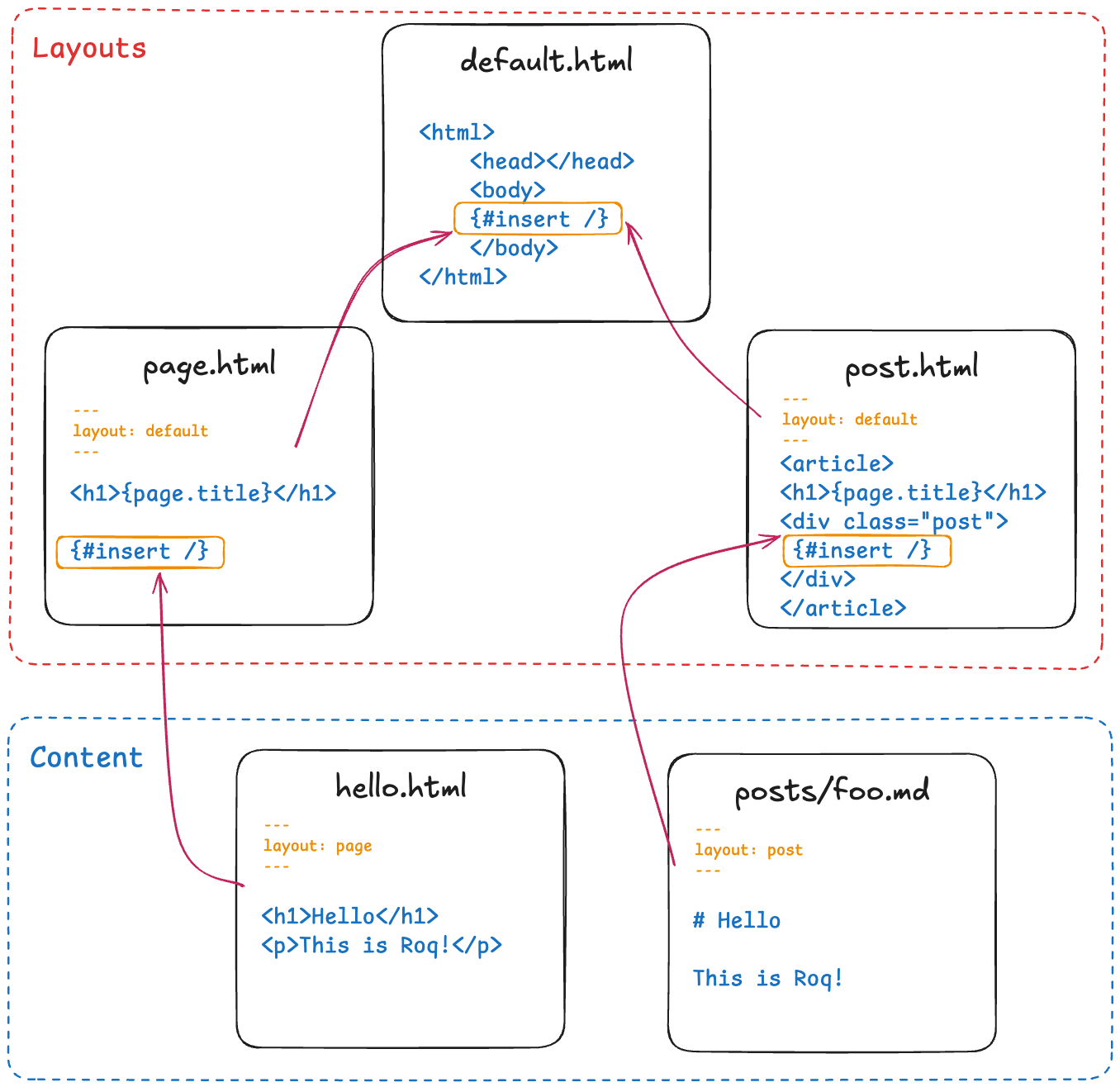
👩🏻💻 › In templates/layouts/default.html replace the {#insert /} this in the <main> by this:
<h1 class="text-4xl font-bold tracking-tight sm:text-5xl">One template to rule them all 💍</h1>
👀 › All pages in the site is now showing this message
Partials (located in templates/partials/) let you reuse small HTML/Qute snippets—like a header, a footer, a card, a pagination block, or a meta block. Instead of repeating the same HTML everywhere, you include them with {#include partials/… /}, keeping layouts and pages clean and consistent.
Tags (located in templates/tags/) are small, self-contained components you can call from any template. They behave like mini-templates with parameters, useful for things like buttons, cards, or repeated UI fragments. You invoke them using Qute’s {#your-tag foo="bar"} syntax, and they keep your templates much cleaner by replacing boilerplate HTML with a reusable tag definition.
@TemplateExtension methods can be used to extend the data classes with new functionality from Java (to extend the set of accessible properties and methods). For example, it is possible to add computed properties and virtual methods.
🔥 Episode 6 – Themes
If you create a Roq app using Code Quarkus, you’ll notice that you get a fully styled, well-structured website without writing any template or CSS yourself. That’s because Roq allow to use themes, which provide all the building blocks: layouts, components, styles, scripts, and templates.
Roq themes are deeply overridable, letting you replace or extend only what you need while keeping the rest intact. This keeps your project focused on the content, not the design system. Whenever you want to adjust a layout, change a component, or tweak the styling, you simply override that part in your project, and the rest of the theme continues to work seamlessly.
You can also create your own. The process is very similar to what we’ve seen in this demo: you define your layouts, templates, components, and styles, and Roq takes care of wiring everything together. This gives you full freedom to shape the look and feel of your site while still benefiting from Roq’s structure and conventions.
🗿 Season Finale – Publishing
Up to this point, you haven’t actually generated anything — you’ve just been using Quarkus to build and render your app. Add a Java service, plug in a database with Quarkus extensions, and it works fine. That’s a different path, though, because you’ll need a server to run it.
For static site generation, you only need static files to run on a static server. Roq makes this simple by providing a command for your CI or a GitHub Action. Learn more about publishing with Roq here.
Conclusion
I hope you enjoyed the demo and consider using Roq for your next site. If you want to show your support, give Roq a star on GitHub.
The Roq users and community are growing, and I hope to see you there soon 🚀.
Plenty of new things are coming in the next few months — a CMS, i18n for collections, a dead-link checker, an mkdocs theme, and more.
If you spot issues, have ideas for cool features, or want to contribute, you’re more than welcome ❤️

 steinhauer.software